LRDIMM vs RDIMM: Capacity, Compatibility, Cost
Most memory buying mistakes are not arithmetic mistakes. They are type mistakes: a module with the right capacity and the right speed that the board will not train, or will not accept at the population the buyer planned. LRDIMM versus RDIMM is where that happens most often, because the two look identical on the shelf and the difference is invisible until the server refuses to boot.
This guide explains what the two types actually are, what the load-reduced buffer buys you, why the compatibility rules are stricter than they look, and how to choose when you are buying for a specific platform rather than a general one.
What the two types actually are
A RDIMM is a registered DIMM. Its register chip sits between the memory controller and the DRAM: it takes the address and command signals, buffers them, and drives them out to the DRAM packages on the module. That is what allowed servers to carry more ranks per channel than plain unbuffered memory could manage.
An LRDIMM is a load-reduced DIMM. It registers the address and command lines exactly as a RDIMM does, and then adds a second chip, the load-reduced buffer, which sits in the data path between the DRAM and the memory bus. That extra buffer reduces the electrical load each module presents to the channel.
The practical consequence is simple: an LRDIMM can carry more DRAM ranks on one module before the channel runs out of drive strength. That is how a 32GB four-rank DDR4 module exists at all in a slot that would only tolerate two ranks of conventional registered memory.
What that buys you, and what it costs
What it buys: capacity per module. If you need 32GB or 64GB modules in a DDR4 generation where the RDIMM ceiling is lower, LRDIMM is often the only path. On a platform with a fixed number of slots, that is the difference between 384GB and 768GB.
What it costs: three things, and buyers usually only count the first.
1. Speed. LRDIMM parts generally sit a step behind the fastest RDIMM of the same generation. A 2666 LRDIMM is normal; a 3200 LRDIMM is not.
2. Compatibility. The platform must support LRDIMM. Not every board or BIOS build does, and support is often tied to a specific processor generation.
3. Mixing. This is the expensive one. LRDIMM and RDIMM cannot share a memory channel. If you fill six slots with RDIMMs and add six LRDIMMs to the other six, the result is not a slower server, it is a server that will not train. You either convert the whole population or you keep them in separate machines.
The rules that decide whether a build works
Rank limits per channel. A four-rank LRDIMM consumes twice the channel load of a dual-rank RDIMM. Some platforms will accept one 4Rx4 LRDIMM per channel and nothing else; others accept two. The processor datasheet states the limit, and it is not negotiable by BIOS setting.
Mixed organisation inside a channel. Even within RDIMMs, a 2Rx4 module and a 2Rx8 module of the same capacity and speed are not universally interchangeable. Mixing them can force a lower speed or fail to train. If the platform documentation names an organisation, match it.
Speed settling. Memory support settles at the speed of the slowest module in the channel. A 2133 LRDIMM in a 2666 platform pins that channel to 2133 — not a fault, just arithmetic. If you plan to extend a population later with faster modules, fill at the faster speed now.
BIOS and firmware. LRDIMM support is sometimes added or fixed by a BIOS revision. A board that "supports" LRDIMM on paper may need a firmware update before it will train a specific rank and capacity combination.
Picking by platform rather than by price
The useful question is not "which is cheaper per gigabyte" but "what does this board actually accept".
- Xeon E5-2600 v3 and v4 platforms are the classic LRDIMM territory. On these generations, LRDIMM is how you reach the higher capacities, and the speed step penalty is small in practice because the platform tops out at 2133 or 2400 anyway. A 32GB DDR4-2133 LRDIMM and a 32GB DDR4-2666 LRDIMM cover most of this generation.
- First and second generation Xeon Scalable and EPYC 7002/7003 accept both types in most configurations, so the decision comes back to capacity density, speed ceiling and price. A 32GB DDR4-3200 RDIMM is usually the simpler buy here, because it is the mainstream part and the supply is deeper.
- Where capacity per slot is the constraint, LRDIMM wins on density regardless of the speed step: a 128GB DDR4-3200 LRDIMM in twelve slots is a different class of machine than the equivalent RDIMM population.
The full range is on the server memory page, and capacity planning across channels is covered in DDR5 RDIMM capacity planning — the arithmetic is the same even though the module type differs.
A buying checklist that catches the expensive mistakes
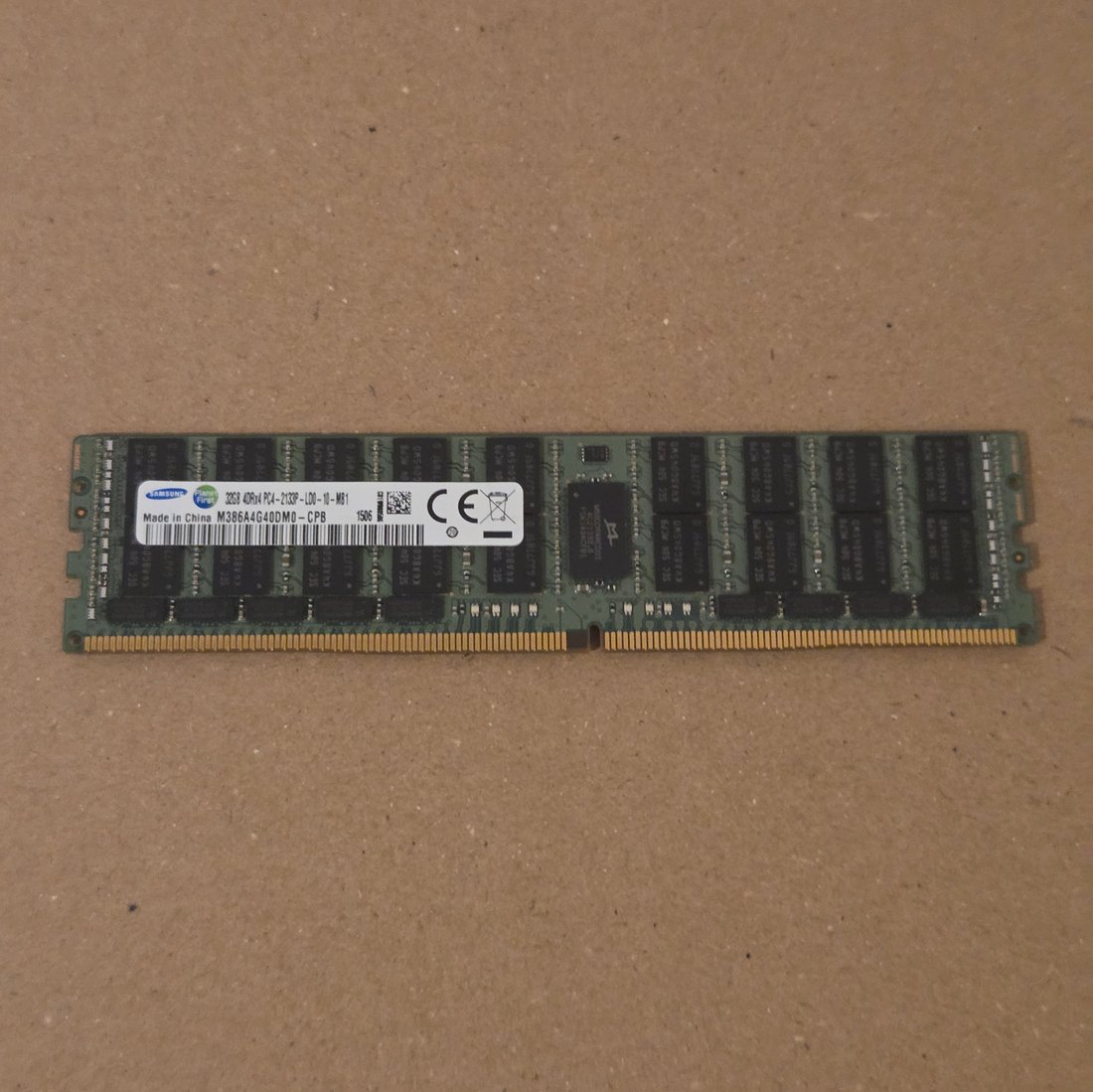
1. Read the label, not the listing. The label states capacity, rank, organisation, speed and type. A seller who cannot photograph the label is a seller who does not know which part they are holding.
2. Confirm the type explicitly. "32GB DDR4" is not a specification. "32GB 4Rx4 DDR4-2666 LRDIMM" is.
3. Check the platform's LRDIMM support before you buy the first module, not after you buy twelve.
4. Count ranks per channel against the processor limit, not just DIMMs per channel.
5. Do not mix types in a channel. Keep LRDIMM populations and RDIMM populations in separate machines.
What we check before an LRDIMM ships
Every module we send goes through the same sequence: the label is read and photographed; the type is confirmed as LRDIMM rather than assumed; the rank and organisation are verified against your order; the load-reduced buffer and SPD are inspected and the SPD read compared against the label; the edge connector is checked under magnification for wear and bent pins; and serials are logged per module before packing so a mixed or short shipment is traceable to the units actually dispatched.
That process exists because the failure mode in this part of the catalogue is not a dead module. It is a correct-looking module of the wrong type arriving at a site where nobody checks until the build fails.
Frequently asked
Can I add LRDIMM to a server already running RDIMM? Not into the same channels. The two types use different buffering and the platform will either reject the population or fail to train. Keep them in separate machines.
Is LRDIMM slower in real workloads? The speed step matters less than the platform ceiling. On an E5 v4 board that tops out at 2400, a 2666 LRDIMM runs at the same 2400 a 2666 RDIMM would. Where the LRDIMM is genuinely slower is on a platform that can reach a higher speed with RDIMMs.
Why is 4Rx4 so common for LRDIMM? Because four ranks is the point: the buffer is what makes four ranks electrically possible. A 4Rx4 module raises the load on the channel, which is why the ranks-per-channel limit matters more than the DIMM count.
Do I need LRDIMM to reach high capacity? On DDR4 generations where the RDIMM ceiling is 32GB per module, yes — LRDIMM is how 64GB and 128GB modules exist. On DDR5 the situation is different, because higher-density RDIMMs are available without the load-reduced design.
How do I know the module I am sent is the type I ordered? Read the label: it carries the rank and type designation, and the SPD read should agree with it. That is precisely what we photograph and record before dispatch, and it is what you should ask any supplier for.
Ready to price a specific population? Send the platform, the number of channels and the capacity you need, and we will confirm the type, the rank limit and the stock. Request a quote.